


On Saturday, November 14, 2026, we migrated our US cloud infrastructure for GAMS Engine SaaS during a 90-minute maintenance period. The goal was to improve resilience and make future updates easier to manage. This was the first downtime affecting job submission and execution on the US service since December 2024.
GAMS Engine runs GAMS and GAMSPy models on central computing resources, handling job submission, scheduling, execution, and result collection. With Engine SaaS, GAMS also operates the infrastructure behind those jobs.
Preparing the migration
Customers received approximately one month’s notice of the maintenance. For our team, the main challenge was fitting the database move into the planned 90-minute maintenance window.
Exporting the old MongoDB database alone took 70–80 minutes. That left too little time to restore it and finish the other work. We needed a different plan.
The solution was to move most of the data ahead of time. Two days before maintenance, we took storage snapshots, recovered copies in the cluster, and used them to populate the new databases while customers continued using the existing service. During maintenance, we would only need to synchronize the changes made since those snapshots.
The day before the migration, we rehearsed that synchronization. For PostgreSQL, this included identifying changed tables and comparing hashes to check data integrity. Writing and testing the transfer scripts gave us a chance to find problems before the maintenance clock started.
On the day, the database migration took 20 minutes. That left time within the 90-minute window to review the deployment and resolve minor issues. Job submission and execution resumed after the full maintenance period. We continued monitoring for several hours afterward, and the operations team reported that all jobs were running on the updated infrastructure.
What changed in the US infrastructure
A repeatable deployment process
We moved the US cluster to the Engine Helm chart , which was already available to Engine K customers and in use in our EU cluster. A Helm chart describes how an application is deployed on Kubernetes. It allows us to apply configuration changes and database migrations together through a single deployment command.
Sharing that chart makes changes easier to prepare, review, and repeat. It also means lessons from running SaaS feed back into the tools available to Engine K customers. For this migration, we simplified the external database configuration: one connection URI for each database can now supply the settings across Engine components.
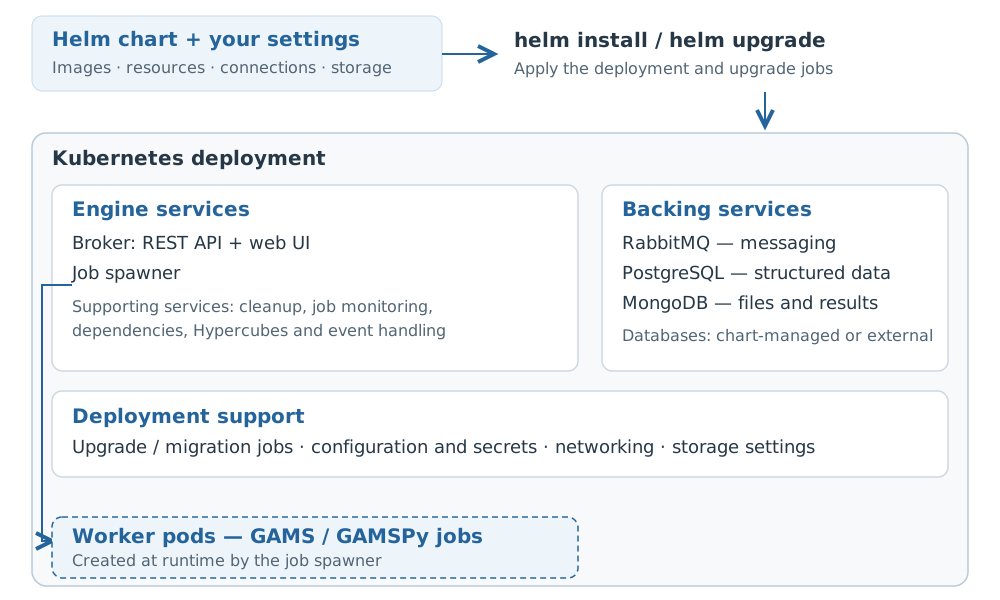
A bird’s-eye view of the Engine Helm chart .
Redundant databases
To increase robustness, both PostgreSQL and MongoDB now run with three database instances and automatic failover. PostgreSQL is managed by CloudNativePG, and MongoDB by a Kubernetes operator. These tools manage the database deployments and allow a replica to take over when the active instance fails, reducing dependence on any one instance.
Failover helps when an instance goes down. Of course we still have backups and a tested restoration procedure in place if a disaster occurs.
What running Engine SaaS taught us
Since we introduced Engine SaaS in 2022 , customer workloads have given us plenty to work on. Bursts of short jobs and large batches of long-running jobs put different demands on the service.
Thousands of jobs that finish in seconds
When a job finishes in a few seconds, the time spent getting a worker ready becomes hard to ignore. Some customers submit many thousands of these short jobs in a brief period. Starting a fresh worker for each one adds overhead that can account for a substantial share of the total time.
Our answer was instance pools : keep workers ready for the next job. Each customer can have their own private pool of instances, reserved for their workloads. Customers can configure the number of instances in their pool to match the amount of work they want to run in parallel. A smaller pool may be enough for a steady trickle of jobs; a larger one can handle more jobs at once.
An available worker can take another job without being created afresh; when all workers in the pool are busy, further jobs queue until one becomes free. For customers running many short jobs, that means less time waiting for workers to start between runs, with a pool sized to their needs.
The trade-off is that idle workers also consume quota at the instance’s configured idle rate. These idle rates are very close to the underlying AWS instance rates, and GAMS does not make a profit on idle instances. Keeping a larger pool ready can reduce waiting during bursts, but uses more quota when demand is low. For infrequent jobs where startup time matters less, workers created on demand may be a better fit. Pools can be scaled up or down as demand changes. The linked documentation explains pool configuration and quota accounting.
Long-running jobs at large scale
Long-running jobs brought a different challenge. Working with Rhodium Group , we reached the limit of the capacity available to us in one location. Their workload used z1d instances, the fastest option for them at the time. At that scale, we could no longer obtain additional z1d instances in the single availability zone our service used then.
The cloud still needs machines available where you request them. Our US service now spans five availability zones, giving it access to capacity across more locations within the AWS region and reducing dependence on a single zone. That gives us more room to scale and supports resilience as the service grows.
In both cases, solve time was only part of the story. Worker startup and available cloud capacity could each become the bottleneck, depending on the workload.
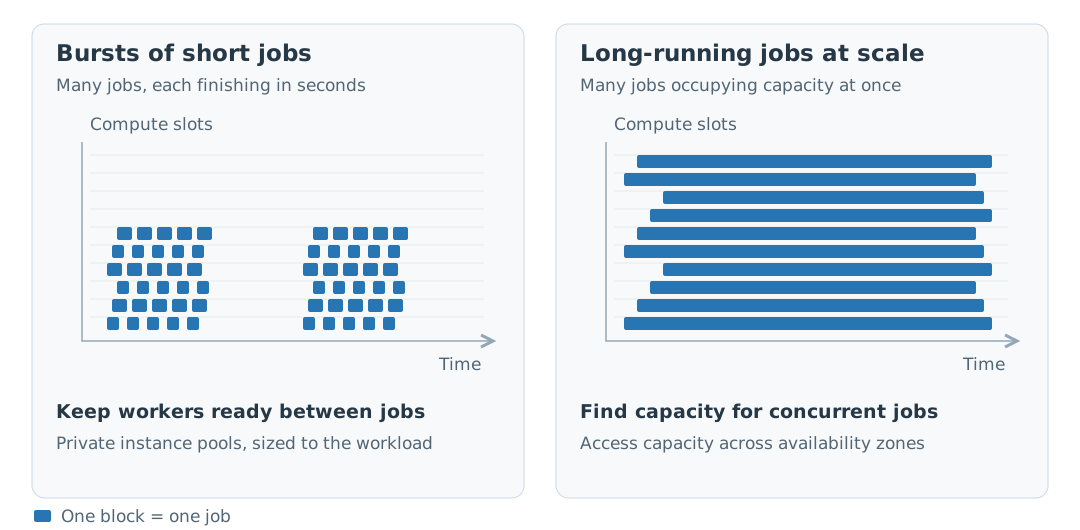
Two workload patterns, two operational challenges.
More control over container image availability
An earlier operational lesson concerned the images behind our containers. Engine’s services run in containers, which are created from container images. A running container may not need to download its image again, but a replacement on a new node does. An image disappearing from a registry can therefore go unnoticed until it is needed for recovery or scaling.
We encountered that risk when a third-party registry removed a pgBouncer image used by our infrastructure. Depending on someone else’s copy means their decision to remove an image can become your operational problem, even if nothing in your own deployment has changed.
Before the November migration, we had already started keeping the images we use in a GAMS-managed repository in Amazon Elastic Container Registry (ECR) across all our cloud deployments. We control which images we retain, instead of relying on a third party to keep the versions our deployments need.
What this means for customers
Who performs the infrastructure work is a key distinction between deployment options. With Engine One, your team operates a single-machine installation; with Engine K, it operates a Kubernetes deployment. With Engine SaaS, GAMS manages the infrastructure, monitoring, updates, backups, and recovery preparation. Your team remains responsible for its models, data, and application integration.
To explore which deployment fits your organization, visit the Engine product overview . For technical detail, see the Engine architecture and security and SaaS operations documentation .